
diff options
Diffstat (limited to 'doc')
| -rw-r--r-- | doc/arch/README.md | 90 | ||||
| -rw-r--r-- | doc/arch/purpose_objectives_values.md | 78 | ||||
| -rw-r--r-- | doc/arch/put_architecture_docs_here.md | 0 | ||||
| -rw-r--r-- | doc/branches-explained.md | 40 | ||||
| -rw-r--r-- | doc/code-conventions.md | 57 | ||||
| -rw-r--r-- | doc/file-locking.md | 366 | ||||
| -rw-r--r-- | doc/getting-started-with-hdf5-development.md | 866 | ||||
| -rw-r--r-- | doc/img/release-schedule.plantuml | 34 | ||||
| -rw-r--r-- | doc/img/release-schedule.png | bin | 0 -> 13977 bytes | |||
| -rw-r--r-- | doc/library-init-shutdown.md | 56 | ||||
| -rw-r--r-- | doc/parallel-compression.md | 313 |

11 files changed, 1900 insertions, 0 deletions
diff --git a/doc/arch/README.md b/doc/arch/README.md new file mode 100644 index 0000000..125e5a2 --- /dev/null +++ b/doc/arch/README.md @@ -0,0 +1,90 @@ +# An Overview of the HDF5 Library Architecture + +## [Purpose, Objectives, and Values](./purpose_objectives_values.md) + +## Data and Metadata + +### Mapping User Data to HDF5 Files + +#### The HDF5 File Format + +### Mapping User Data to Storage + +### Data Retained in the Library + +## Functional Decomposition + +### Components + +#### Selection +#### Datatype Conversion +#### Filter Pipeline +#### Caching & Buffering +#### File-space Management +#### Opening a File +#### Creating an Object +#### Dataset I/O + +### Use Cases + +#### Parallel HDF5 +#### SWMR +#### VDS +#### Paged Allocation +#### … + +### Feature (In-)Compatibility Matrix + +## Modular Library Organization + +### Library Internals + +#### Boilerplate and Misc. +#### Memory Allocation and Free Lists +#### API Contexts +#### Metadata Cache +#### Files and the Open File List +#### Platform Independence + +### Modules + +#### IDs +#### Property Lists +#### Error Handling +#### File Objects +#### Datasets +#### Groups and Links +#### Datatypes +#### Dataspaces +#### Attributes + +### Extension Interfaces + +#### Filters +#### Virtual File Layer and Virtual File Drivers +#### Virtual Object Layer + +### Language Bindings + +#### General Considerations +#### Fortran +#### Java + +## Performance Considerations + +## Library Development and Maintenance + +### Build Process + +### Testing + +#### Macro Schemes +#### `testhdf5` +#### Other Test Programs +#### (Power)Shell Scripts +#### CMake vs Autotools +#### VOL and VFD Inclusion/Exclusion + +### Versioning and Releases + +## References diff --git a/doc/arch/purpose_objectives_values.md b/doc/arch/purpose_objectives_values.md new file mode 100644 index 0000000..880e4e4 --- /dev/null +++ b/doc/arch/purpose_objectives_values.md @@ -0,0 +1,78 @@ +## Purpose, Objectives, & Values + +The purpose of the HDF5 library is to ensure efficient and equitable access to science and engineering data stored in HDF5 across platforms and environments, now and forever. Toward that purpose, the two main objectives are: + +1. Self-describing data +2. Portable encapsulation and access. + +Self-describing data captures all information about itself necessary to reproduce and interpret it as intended by its producer. A storage representation must preserve the self-describing nature when transferring such representations over a network or to different storage. At the same time, it should be accompanied by a portable library that allows applications to access the data without knowing anything about the details of the representation. + +The "marriage"[^1] of the HDF5 file format and library is a specific implementation of the primitives and operations defined by the HDF5 data model and adapted for several specific use cases. + +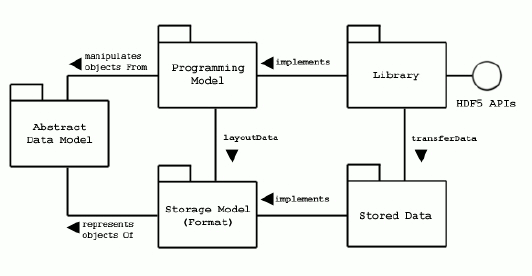 + +The following values[^2][^3] guide the implementation (in no particular order): + +<dl> + <dt>Extensibility</dt> + <dd>The degree to which behavior and appearance can be changed by users. + <ul> + <li>Datatypes, conversions</li> + <li>Filters</li> + <li>Links</li> + <li>Data virtualization</li> + <li>Storage types</li> + </ul> + Evolution of the file format + <ul> + <li>Micro-versioning</li> + </ul> + </dd> + + <dt>Compatibility, Longevity, & Stability</dt> + <dd>Things that worked before continue to work the same indefinitely + <ul> + <li>Quasi-fixed data model</li> + <li>Backward- and forward compatibility</li> + <li>API Versioning</li> + <li>File format specification</li> + </ul> + </dd> + + <dt>Efficiency</dt> + <dd>Effective operation as measured by a comparison of production with cost (as in time, storage, energy, etc.) + <ul> + <li>Algorithmic complexity</li> + <li>Scalability</li> + </ul> + </dd> + + <dt>Maintainability</dt> + <dd>The degree to which it can be modified without introducing fault + <ul> + <li>Additive software construction</li> + </ul> + </dd> + + <dt>Progressiveness</dt> + <dd>A measure of eagerness to make progress and leverage modern storage technology</dd> + + <dt>Freedom</dt> + <dd>Specifically, free software means users have the four essential freedoms: + <ul> + <li>The freedom to run the program as you wish, for any purpose (freedom 0).</li> + <li>The freedom to study how the program works, and change it so it does your computing as you wish (freedom 1). Access to the source code is a precondition for this.</li> + <li>The freedom to redistribute copies so you can help others (freedom 2).</li> + <li>The freedom to distribute copies of your modified versions to others (freedom 3). By doing this you can give the whole community a chance to benefit from your changes. Access to the source code is a precondition for this.</li> + </ul> + </dd> + + +</dl> + + + + +[^1]: Jeffrey A. Kuehn: [Faster Libraries for Creating Network-Portable Self-Describing Datasets](https://cug.org/5-publications/proceedings_attendee_lists/1997CD/S96PROC/289_293.PDF), CUG 1996 Spring Proceedings +[^2]: Chris Hanson & Gerald Jay Sussman: [Software Design for Flexibility: How to Avoid Programming Yourself into a Corner](https://mitpress.mit.edu/9780262045490/software-design-for-flexibility/), MIT Press. +[^3]: Free Software Foundation: [What is Free Software?](https://www.gnu.org/philosophy/free-sw.en.html) diff --git a/doc/arch/put_architecture_docs_here.md b/doc/arch/put_architecture_docs_here.md new file mode 100644 index 0000000..e69de29 --- /dev/null +++ b/doc/arch/put_architecture_docs_here.md diff --git a/doc/branches-explained.md b/doc/branches-explained.md new file mode 100644 index 0000000..5b55ec7 --- /dev/null +++ b/doc/branches-explained.md @@ -0,0 +1,40 @@ +# HDF5 Git Branching Model Explained + +This document describes current HDF5 branches. + +Branches are tested nightly and testing results are available at https://cdash-internal.hdfgroup.org/ and https://cdash.hdfgroup.org/. +Commits that break daily testing should be fixed by 3:00 pm Central time or reverted. +We encourage code contributors to check the status of their commits. If you have any questions, please contact help@hdfgroup.org. + +## `develop` +Develop is the main branch whose source code always reflects a state with the latest delivered development changes for the next major release of HDF5. +This is also considered the integration branch, as **all** new features are integrated into this branch from respective feature branches. Although +develop is considered an integration branch, it is not an unstable branch. All code merged to develop is expected to pass all GitHub actions and daily tests. + +## `Maintenance branches` +Each currently supported release line of HDF5 (e.g. 1.8.x, 1.10.x, 1.12.x) has an associated branch with the name hdf5\_1\_10, etc.. +Maintenance branches are similar to the develop branch, except the source code in a maintenance branch always reflects a state +with the latest delivered development changes for the next **maintenance** release of that particular supported release-line of HDF5. +**Some** new features will be integrated into a release maintenance branch, depending on whether or not those features can be +introduced in minor releases. Maintenance branches are removed when a release-line is retired from support. + +## `Release branches` +Release branches are used to prepare a new production release. They are primarily used to allow for last minute dotting of i's and crossing of t's +(things like setting the release version, finalizing release notes, and generating Autotools files) and do not include new development. +They are created from the maintenance branch at the time of the maintenance release and have +names like hdf5\_1\_10\_N, where N is the minor release number. Once the release is done it is tagged, with a slightly different format: hdf5-1\_\10\_N. +Release branches are deleted after the tag has been created. If we have to create a patch version of a release (which is rare), we create a branch off of the tag. + +## `feature/*` +Feature branches are temporary branches used to develop new features in HDF5. +Feature branches branch off of develop and exist as long as the feature is under development. +When the feature is complete, the branch is merged back into develop, as well as into any support branches in which the change will be included, and then the feature branch is removed. + +Ideally, all feature branches should contain a BRANCH.md file in the root directory that explains the purpose of the branch, contact information for the person responsible, and, if possible, some clues about the branch's life cycle (so we have an idea about when it can be deleted, merged, or declared inactive). + +Minor bug fixes and refactoring work usually takes place on personal forks, not feature branches. + +## `inactive/*` +These branches are for experimental features that were developed in the past, have not been merged to develop, and are not under active development. The exception to this is that some feature branches are labeled inactive and preserved for a short time after merging to develop. Integration branches are usually not kept in sync with the develop branch. + +As for feature branches, inactive branches should have a BRANCH.md file as described above. diff --git a/doc/code-conventions.md b/doc/code-conventions.md new file mode 100644 index 0000000..ff3b4cf --- /dev/null +++ b/doc/code-conventions.md @@ -0,0 +1,57 @@ +# HDF5 Library Code Conventions + +This document describes some practices that are new, or newly +documented, starting in 2020. + +## Function / Variable Attributes + +In H5private.h, the library provides platform-independent macros +for qualifying function and variable definitions. + +### Functions that accept `printf(3)` and `scanf(3)` format strings + +Label functions that accept a `printf(3)`-compliant format string with +`H5_ATTR_FORMAT(printf,format_argno,variadic_argno)`, where +the format string is the `format_argno`th argument (counting from 1) +and the variadic arguments start with the `variadic_argno`th. + +Functions that accept a `scanf(3)`-compliant format string should +be labeled `H5_ATTR_FORMAT(scanf,format_argno,variadic_argno)`. + +### Functions that do never return + +The definition of a function that always causes the program to abort and hang +should be labeled `H5_ATTR_NORETURN` to help the compiler see which flows of +control are infeasible. + +### Other attributes + +**TBD** + +### Unused variables and parameters + +Compilers will warn about unused parameters and variables—developers should pay +attention to those warnings and make an effort to prevent them. + +Some function parameters and variables are unused in *all* configurations of +the project. Ordinarily, such parameters and variables should be deleted. +However, sometimes it is possible to foresee a parameter being used, or +removing it would change an API, or a parameter has to be defined to conform a +function to some function pointer type. In those cases, it's permissible to +mark a symbol `H5_ATTR_UNUSED`. + +Other parameters and variables are unused in *some* configurations of the +project, but not all. A symbol may fall into disuse in some configuration in +the future—then the compiler should warn, and the symbol should not be +defined—so developers should try to label a sometimes-unused symbol with an +attribute that's specific to the configurations where the symbol is (or is not) +expected to be used. The library provides the following attributes for that +purpose: + +* `H5_ATTR_DEPRECATED_USED`: used only if deprecated symbols are enabled +* `H5_ATTR_NDEBUG_UNUSED`: used only if `NDEBUG` is *not* \#defined +* `H5_ATTR_DEBUG_API_USED`: used if the debug API is enabled +* `H5_ATTR_PARALLEL_UNUSED`: used only if Parallel HDF5 *is not* configured +* `H5_ATTR_PARALLEL_USED`: used only if Parallel HDF5 *is* configured + +Some attributes may be phased in or phased out in the future. diff --git a/doc/file-locking.md b/doc/file-locking.md new file mode 100644 index 0000000..4f7fb39 --- /dev/null +++ b/doc/file-locking.md @@ -0,0 +1,366 @@ +# File Locking in HDF5 + +This document describes the file locking scheme that was added to HDF5 in +version 1.10.0 and how you can work around it, if you choose to do so. I'll +try to keep it understandable for everyone, though diving into technical +details is unavoidable, given the complexity of the material. We're in the +process of converting the HDF5 user guide (UG) to Doxygen and this document +will eventually be rolled up into those files as we update things. + +**Parallel HDF5 Note** + +Everything written here is from the perspective of serial HDF5. When we say +that you can't access a file for write access from more than one process, we +mean "from more than one independent, serial process". Parallel HDF5 can +obviously write to a file from more than one process, but that involves +IPC and multiple processes working together, not independent processes with +no knowledge of each other, which is what the file locks are for. + + +## Why file locks? + +The short answer is: "To prevent you from corrupting your HDF5 files and/or +crashing your reader processes." + +The long answer is more complicated. + +An HDF5 file's state exists in two places when it is open for writing: + +1. The HDF5 file itself +2. The HDF5 library's various caches + +One of those caches is the metadata cache, which stores things like B-tree +nodes that we use to locate data in the file. Problems arise when parent +objects are flushed to storage before child objects. If a reader tries to +load unflushed children, the object's file offset could point at garbage +and it will encounter library failures as it tries to access the non-existent +objects. + +Keep in mind that the HDF5 library is not analogous to a database server. The +HDF5 library is just a simple shared library, like libjpeg. Library state is +maintained per-library-instance and there is no IPC between HDF5 libraries +loaded by different processes (exception: collective operations in parallel +HDF5, but that's not what were talking about here). + +Prior to HDF5 1.10.0, concurrent access to an HDF5 file by multiple processes, +when one or more processes is a writer, was not supported. There was no +enforcement mechanism for this. We simply told people not to do it. + +In HDF5 1.10.0, we updated the library to allow the single-writer / multiple-readers +(SWMR - pronounced "swimmer") access pattern. This setup allows one writer and +multiple readers to access the same file, as long as a certain protocol is +followed concerning file opening order and setting the right flags. Since +synchronization might be tricky to pull off and the consequences of getting +it wrong could result in corrupt files or crashed readers, we decided to add +a file locking scheme to help users get it right. Since this would also help +prevent harmful accesses when SWMR is not in use, we decided to switch the +file locking scheme on by default. This scheme has been carried forward into +HDF5 1.12 and 1.13 (soon to be 1.14). + +Note that the current implementation of SWMR is only useful for appending to chunked +datasets. Creating file objects like groups and datasets is not supported +in the current SWMR implementation. + +Unfortunately, this file locking scheme has caused problems for some users. +This is usually people who are working on network file systems like NFS or +on parallel file systems, especially when file locks have been disabled, which +often causes lock calls to fail. As a result of this, we've added work-arounds +to disable the file locking scheme over the years. + +## The existing scheme + +There are two parts to the file locking scheme. One is the file lock itself. +The second is a mark we make in the HDF5 file's superblock. The superblock +mark isn't really that important for understanding the file locking, but since +it's entwined with the file locking scheme, we'll cover it in the +algorithm below. The lower-level details of file lock implementations are +described in the appendix, but the semantics are straightforward: Locks are +mandatory unless disabled, always for the entire file, and non-blocking. They +are also not required for SWMR operations and simply exist to help you set up +SWMR and prevent dangerous file access. + +Here's how it all works: + +1. The first thing we do is check if we're using file locks + + - We first check the file locking property in the file access property list + (fapl). The default value of this property is set at configure time when + the library is built. + - Next we check the value of the `HDF5_USE_FILE_LOCKING` environment variable, + which was previously parsed at library startup. If this is set, + we use the value to override the property list setting. + + The particulars of the ways you can disable file locks are described in a + separate section below. + + If we are not using file locking, no further file locking operations will + take place. + +2. We also check for ignoring file locks when they are disabled on the file system. + + - The environment variable setting for this is checked at VFD initialization + time for all library VFDs. + - We check the value in the fapl in the `open` callback. The default value for + this property was set at configure time when the library was built. + +3. When we open a file, we lock it based on the file access flags: + + - If the `H5F_ACC_RDWR` flag is set, use an exclusive lock + - Otherwise use a shared lock + + If we are ignoring disabled file locks (see below), we will silently swallow + lock API call failure when locks are not implemented on the file system. + +4. If the VFD supports locking and the file is open for writing, we mark the + file consistency flags in the file's superblock to indicate this. + + **NOTE!** + + - The VFD has to have a lock callback for this to happen. It doesn't matter if + the locking was disabled - the check is simply for the callback. + - We mark the superblock in **ANY** write case - both SWMR and non-SWMR. + - Only the latest version of the superblock is marked in this way. If you + open up a file that wasn't created with the 1.10.0 or later file format, + it won't get the superblock mark, even if it's been opened for writing. + + According to the file format document and H5Fpkg.h: + + - Bit 0 is set if the file is open for writing (`H5F_SUPER_WRITE_ACCESS`) + - Bit 2 is set if the file is open for SWMR writing (`H5F_SUPER_SWMR_WRITE_ACCESS`) + + We check these superblock flags on file open and error out if they are + unsuitable. + + - If the file is already opened for non-SWMR writing, no other process can open + it. + - If the file is open for SWMR writing, only SWMR readers can open the file. + - If you try to open a file for reading with `H5F_ACC_SWMR_READ` set and the + file does not have the SWMR writer bits set in the superblock, the open + call will fail. + + This scheme is often confused with the file locking, so it's included here, + even though it's a bit tangential to the locks themselves. + +5. If the file is open for SWMR writing (`H5F_ACC_SWMR_WRITE` is set), we + remove the file lock just before the open call completes. + +6. We normally don't explicitly unlock the file on file close. We let the OS + handle it when the file descriptors are closed since file locks don't + normally surivive closing the underlying file descriptor. + +**TL;DR** + +When locks are available, HDF5 files will be exclusively locked while they are +in use. The exception to this are files that are opened for SWMR writing, which +are unlocked. Files that are open for any kind of writing get a "writing" +superblock mark that HDF5 1.10.0+ will respect and refuse to open outside of SWMR. + +## `H5Fstart_swmr_write()` + +This API call can be used to switch an open file to "SWMR writing" mode as +if it had been opened with the `H5F_ACC_SWMR_WRITE` flag set. This is used +when code needs to perform SWMR-forbidden operations like creating groups +and datasets before appending data to datasets using SWMR. + +Most of the work of this API call involves flushing out the library caches +in preparation for SWMR access, but there are a few locking operations that +take place under the hood: + +- The file's superblock is marked as in the SWMR writer case, above. +- For a brief period of time in the call, we convert the exclusive lock to + a shared lock. It's unclear why this was done and we'll look into removing + this. +- At the end of the call, the lock is removed, as in the SWMR write open + case described above. + +## Disabling the locks + +There are several ways to disable the locks, depending on which version of the +HDF5 library you are working with. This section will describe the file lock +disable schemes as they exist in late 2022. The current library versions at +this time are 1.10.9, 1.12.3, and 1.13.2. File locks are not present in HDF5 +1.8. The lock feature matrix later in this document will describe the +limitations of earlier versions. + +### Configure option + +You can set the file locking defaults at configure time. This sets the defaults +for the associated properties in the fapl. Users can override the configure +defaults using `H5Pset_file_locking()` or the `HDF5_USE_FILE_LOCKING` +environment variable. + +- Autotools + + `--enable-file-locking=(yes|no|best-effort)` sets the file locking behavior. + `on` and `off` should be self-explanatory. `best-effort` turns file locking + on but ignores file locks when they are disabled (default: `best-effort`). + +- CMake + + - set `IGNORE_DISABLED_FILE_LOCK` to `ON` to ignore file locks when they + are disabled on the file system (default: `ON`). + - set `HDF5_USE_FILE_LOCKING` to `OFF` to disable file locks (default: `ON`) + +### `H5Pset_file_locking()` + +This API call can be used to override the configure defaults. It takes +`hbool_t` parameters for both the file locking and "ignore file locks when +disabled on the file system" parameters. The values set here can be +overridden by the file locking environment variable. + +There is a corresponding `H5Pget_file_locking()` call that can be used to check +the currently set values of both properties in the fapl. **NOTE** that this +call just checks the property list values. It does **NOT** check the +environment variables! + +### Environment variables + +The `HDF5_USE_FILE_LOCKING` environment variable overrides all other file +locking settings. + +HDF5 1.10.0 +- No file locking environment variable + +HDF5 1.10.1 - 1.10.6, 1.12.0: +- `FALSE` turns file locking off +- Anything else turns file locking on +- Neither of these values ignores disabled file locks +- Environment variable parsed at file create/open time + +HDF5 1.10.7+, 1.12.1+, 1.13.x: +- `FALSE` or `0` disables file locking +- `TRUE` or `1` enables file locking +- `BEST_EFFORT` enables file locking and ignores disabled file locks +- Anything else gives you the defaults +- Environment variable parsed at library startup + +### Lock disable scheme interactions + +As mentioned above and reiterated here: +- Configure-time settings set fapl defaults +- `H5Pset_file_locking()` overrides configure-time defaults +- The environment variable setting overrides all + +If you want to check that file locking is on, you'll need to check the fapl +setting AND check the environment variable, which can override the fapl. + +**!!! WARNING !!!** + +Disabling the file locks is at your own risk. If more than one writer process +modifies an HDF5 file at the same time, the file could be corrupted. If a +reader process reads a file that is being modified by a writer, the writer +process might attempt to read garbage and encounter errors or even crash. + +In the case of: + +- A single process accessing a file with write access +- Any number of processes accessing a file read-only + +You can safely disable the file locking scheme. + +If you are trying to set up SWMR without the benefit of the file locks, you'll +just need to be extra careful that you hold to rules for SWMR access. + +## Feature Matrix + +The following table indicates which versions of the library support which file +lock features. 1.13.0 and 1.13.1 are experimental releases (basically glorified +release candidates) so they are not included here. + +**Locks** + +- P = POSIX locks only, Windows was a no-op that always succeeded +- WP = POSIX and Windows locks +- (-) = POSIX no-op lock fails +- (+) = POSIX no-op lock passes + +**Configure Option and Environment Variable** + +- on/off = sets file locks on/off +- try = can also set "best effort", where locks are on but ignored if disabled + +|Version|Has locks|Configure option|`H5Pset_file_locking()`|`HDF5_USE_FILE_LOCKING`| +|-------|---------|----------------|-----------------------|-----------------------| +|1.8.x|No|-|-|-| +|1.10.0|P(-)|-|-|-| +|1.10.1|P(-)|-|-|on/off| +|1.10.2|P(-)|-|-|on/off| +|1.10.3|P(-)|-|-|on/off| +|1.10.4|P(-)|-|-|on/off| +|1.10.5|P(-)|-|-|on/off| +|1.10.6|P(-)|-|-|on/off| +|1.10.7|P(+)|try|Y|try| +|1.10.8|WP(+)|try|Y|try| +|1.10.9|WP(+)|try|Y|try| +|1.12.0|P(-)|-|-|on/off| +|1.12.1|WP(+)|try|Y|try| +|1.12.2|WP(+)|try|Y|try| +|1.13.2|WP(+)|try|Y|try| + + +## Appendix: File lock implementation + +The file lock system is implemented with `flock(2)` as the archetype since it +has simple semantics and we don't need range locking. Locks are advisory on many +systems, but this shouldn't be a problem for most users since the HDF5 library +always respects them. If you have a program that parses or modifies HDF5 files +independently of the HDF5 library, you'll want to be mindful of any potential +for concurrent access across processes. + +On Unix systems, we call `flock()` directly when it's available and pass +`LOCK_SH` (shared lock), `LOCK_EX` (exclusive lock), and `LOCK_UN` (unlock) as +described in the algorithm section. All locks are non-blocking, so we set the +`LOCK_NB` flag. Sadly, `flock(2)` is not POSIX and it doesn't lock files over +NFS. We didn't consider a lack of NFS support a problem since SWMR isn't +supported on networked file systems like NFS (write order preservation isn't +guaranteed) and `flock(2)` usually doesn't fail when you attempt to lock NFS +files. + +On Unix systems without `flock(2)`, we implement a scheme based on `fcntl(2)` +(`Pflock()` in `H5system.c`). On these systems we use `F_SETLK` (non-blocking) +as the operation and set `l_type` in `struct flock` to be: + +- `F_UNLOCK` for `LOCK_UN` +- `F_WRLOCK` for `LOCK_EX` +- `F_RDLOCK` for `LOCK_SH` + +We set the range to be the entire file. Most Unix-like systems have `flock()` +these days, so this system probably isn't very well tested. + +We don't use `fcntl`-based open file locks or mandatory locking anywhere. The +former scheme is non-POSIX and the latter is deprecated. + +On Windows, we use `LockFileEx()` and `UnlockFileEx()` to lock the entire file +(`Wflock()` in `H5system.c`). We set `LOCKFILE_FAIL_IMMEDIATELY` to get +non-blocking locks and set `LOCKFILE_EXCLUSIVE_LOCK` when we want an exclusive +lock. SWMR isn't well-tested on Windows, so this scheme hasn't been as +thoroughly vetted as the `flock`-based scheme. + +On non-Windows systems where neither `flock(2)` nor `fcntl(2)` is available, +we substitute a no-op stub that always succeeds (`Nflock()` in `H5system.c`). +In the past, the stub always failed (see the matrix for when we made the switch). +We currently know of no non-Windows systems where neither call is available +so this scheme is not well-tested. + +One thing that should be immediately apparent to anyone familiar with file +locking, is that all of these schemes have subtly different semantics. We're +using file locking in a fairly crude manner, though, and lock use has always +been optional, so we consider this a lower-order concern. + +Locks are implemented at the VFD level via `lock` and `unlock` callbacks. The +VFDs that implement file locks are: core (w/ backing store), direct, log, sec2, +and stdio (`flock(2)` locks only). The family, multi, and splitter VFDs invoke +the lock callback of their underlying sub-files. The onion and MPI-IO VFDs do NOT +use locks, even though they create normal, on-disk native HDF5 files. The +read-only S3 VFD and HDFS VFDs do not use file locking since they use +alternative storage schemes. + +Lock failures are detected by checking to see if `errno` is set to `ENOSYS`. +This is not particularly sophisticated and was implemented as a way of working +around disabled locks on popular parallel file systems. + +One other thing to note here is that, in all of the locking schemes we use, the +file locks do not survive process termination, so you don't have to worry +about files being locked forever if a process exits abnormally. If a writer +crashed and the library didn't clear the superblock mark, you can remove it with +the h5clear command-line tool, which is built with the library. diff --git a/doc/getting-started-with-hdf5-development.md b/doc/getting-started-with-hdf5-development.md new file mode 100644 index 0000000..732d817 --- /dev/null +++ b/doc/getting-started-with-hdf5-development.md @@ -0,0 +1,866 @@ +# Getting Started with HDF5 Development + +## Introduction + +The purpose of this document is to introduce new HDF5 developers to some of the +quirks of our source code. It's not a style guide (see the forthcoming HDF5 +style guide for that), but instead describes the most commonly encountered +features that are likely to trip up someone who has never worked with the HDF5 +source code before. + +Corrections and suggestions for improvement should be handled via GitHub pull +requests and issues. + +## Getting started + +### Building the library for development + +You don't really need special configuration settings for building the library +as a developer. + +Some tips that may be useful: + +* Building in debug mode will turn on additional checks in many packages. + You'll probably want to start coding in debug mode. +* You can turn symbols on independently of debug/production mode. +* If you will be looking at memory issues via tools like valgrind, you will + need to turn off the free lists, which recycle memory so we can avoid + calling malloc/free. This is done using the `--enable-using-memchecker` + configure option. Some developers build with this all the time, as the + memory recyclilng can hide problems like use-after-free. +* You can enable developer warnings via `--enable-developer-warnings`. These + warnings generate a lot of noise, but the output can occasionally be useful. + I probably wouldn't turn them on all the time, though, as they can make it + harder to spot warnings that we care about. +* You can set warnings as errors. We have an older scheme that does this for + a subset of errors or you can simply specify `-Werror`, etc. as a part of + `CFLAGS`. Configure is smart enough to strip it out when it runs configure + checks. We build the C library with -Werror on GitHub, so you'll need to fix + your warnings before creating a pull request. +* CMake has a developer mode that turns most these settings on. + + +### Branches + +Please see `doc/branches-explained.md` for an explanation of our branching strategy. + +For new small features, we have developers create feature branches in their own +repositories and then create pull requests into the canonical HDF5 repository. +For larger work, especially when the work will be done by multiple people, we +create feature branches named `feature/<feature>`. If work stops on a feature +branch, we rename it to `inactive/<feature>`. + +If you create a feature branch in the canonical HDFGroup repository, please +create a `BRANCH.md` text file in the repository root and explain: + +* The branch's purpose +* Contact info for someone who can tell us about the branch +* Clues about when the branch will be merged or can be considered for retirement + +The purpose of this document is to avoid orphan branches with no clear +provenance. + + +### Pull requests + +The process of creating a pull request is explained in `CONTRIBUTING.md`. + + +## A brief tour of the source code + +Here's a quick guide to where you can find things in our source tree. Some of these directories have README.md files of their own. + +`bin/` +Scripts we use for building the software and misc. tools. + +`c++/` +Source, tests, and examples for the C++ language wrapper. + +`config/` +Configuration files for both the Autotools and CMake. + +`doc/` +Miscellaneous documents, mostly in markdown format. + +`doxygen/` +Mainly Doxygen build files and other top-level Doxygen things. The Doxygen content is spread across the library's header files but some content can be found here when it has no other obvious home. + +`examples/` +C library examples. Fortran and C++ examples are located in their corresponding wrapper directory. + +`fortran/` +Source, tests, and examples for the Fortran language wrapper. + +`hl/` +Source, tests, and examples for the high-level library. + +`java/` +Source, tests, and examples for the JNI language wrapper and the corresponding OO Java library. + +`m4/` +m4 build scripts used by the Autotools. CMake ignores these. + +`release_docs/` +Install instructions and release notes. + +`src/` +Source code for the C library. + +`test/` +C library test code. Described in much more detail below. + +`testpar/` +Parallel C library test code. Described in much more detail below. + +`tools/` +HDF5 command-line tools code, associated tools tests, and the input test files. + +`utils/` +Small utility programs that don't belong anywhere else. + + +## General Things + +### Necessary software + +In order to do development work on the HDF5 library, you will need to have +a few things available. + +* A C99-compatible C compiler (MSVC counts). C11 is required to build the subfiling feature. +* Either CMake or the Autotools (Autoconf, Automake, libtool) +* Perl is needed to run some scripts, even on Windows +* A C++11-compatible compiler if you want to build the C++ wrappers +* A Fortran 2003-compatible compiler if you want to build the Fortran wrappers +* A Java 8-compatible compiler if you want to build the Java wrappers +* flex/lex and bison/yacc if you want to modify the high-level parsers +* A development version of zlib is necessary for zlib compression +* A development version of szip is necessary for szip compression +* An MPI-3 compatible MPI library must be installed for parallel HDF5 development +* clang-format is handy for formatting your code before submission to GitHub. The formatter will automatically update your PR if it's mis-formatted, though, so this isn't strictly necessary. +* codespell is useful to identify spelling issues before submission to GitHub. The codespell action won't automatically correct your code, but it will point out spelling errors, so this also isn't strictly necessary. + +These are the requirements for working on the develop branch. Maintenance +branches may relax the required versions somewhat. For example, HDF5 1.12 and +earlier only require C++98. + +Certain optional features may require additional libraries to be installed. You'll need curl and some S3 components installed to build the read-only S3 VFD, for example. + +### Platform-independence + +HDF5 assumes you have a C99 compiler and, to a certain extent, a POSIX-like +environment (other languages will be discussed later). On most operating systems +in common use, this will be a reasonable assumption. The biggest exception to +this has been Windows, which, until recently, had poor C99 compliance and spotty +POSIX functionality. To work around differences in platforms and compilers, +we've implemented a compatibility scheme. + +Unlike most codebases, which test for features and inject their own normal-looking +functions when there are deficiencies, HDF5 uses a scheme where we prefix all +C and POSIX calls with `HD` (e.g., `HDmalloc`). The `H5private.h` header handles +most of the fixup for Unix-like operating systems and defines the HD replacements. +For Windows, we first parse the `H5win32defs.h` file, which maps missing Windows +and MSVC functionality to POSIX and C99 calls. `H5private.h` tests for previously +defined HD calls and skips redefining it if it already exists. H5system.c +includes Windows glue code as well as a few functions we need to paper over +differences in Unix-like systems. + +One thing to keep in mind when looking at our platform-independence layer is +that it is quite old, having been authored when the Unix world was much more +fragmented and C99 was uncommon. We've slowly been reworking it as POSIX has +standardized and C99 become widespread. + +Another thing to keep in mind is that we're fairly conservative about deprecating +support for older platforms and compilers. There's an awful lot of ancient +hardware that requires HDF5, so we try to only make major changes to things +like language requirements when we increment the major version (minor version +prior to HDF5 2.0). + +### C99 + +We assume you have a C99 compiler. Subfiling uses some C11 features, but that is +compiled on demand and we are not moving that requirement to the rest of the +library. All modern compilers we've tested can handle HDF5's C99 requirements, +even Microsoft's. In the future, we'll remove the `HD` prefixes from all standard +C library calls. + +One quirk of HDF5's age, is the `hbool_t` type, which was created before C99 +Booleans were widespread and which uses `TRUE` and `FALSE` macros for its values +instead of C99's `true` and `false`. We plan to switch this over to C99's Boolean +types sometime in the near future. + +### POSIX + +We assume basic POSIX.1-2008 functionality is present. When a POSIX (or common Unix) +function is missing on a popular platform, we implement a shim or macro +in `H5private.h` and/or `H5system.c`. Systems that need a lot of help, like +Windows, have gotten special headers in the past (e.g., `H5win32defs.h`) but +now that most platforms implement the POSIX and C99 functionality we need, these +special headers are less necessary. + +### Threads + +Thread-safety was originally implemented using Pthreads, with Win32 support +bolted on later. No other thread libraries are supported. The subfiling +feature uses multiple threads under the hood, but that's out of scope for +an introductory document. Thread-related code is largely confined to the `H5TS` +files, where we define HDF5-specific primitives and then map Pthread or Win32 +implementations onto them. + +### C++ + +The C++ Wrappers require C++11. We generally only require the rule of three +for the classes. + +### Fortran + +The Fortran wrappers require Fortran 2003. + +### Java + +The Java wrappers require Java 8. + +### Warning suppression + +In the rare cases where we've decided to suppress a warning, we have a set +of function-like macros that we use for that. They are located in `H5private.h` +and have the form `H5_<compiler>_DIAG_(OFF|ON)` and take the name of the warning +they are suppressing as a parameter. They were originally designed for gcc and +extended to clang. They have not been updated for other compilers. Instead, +we have plans to revamp the macro system to be more generic and extensible. + +We try to configure the compilers we use the most for maximum grumpiness and +then fix all the warnings we can. Please don't use the warning suppression +macros in lieu of actually fixing the underlying problems. + +## Build Systems + +We support building the library with both the Autotools and CMake. We'd like to +eventually move to only having one build system, which would be CMake since +the Autotools don't really support Windows, but that seems unlikely to happen +anytime soon. With few exceptions, any new feature, test, or configure +option should be supported in both build systems. + +The particulars of the build systems can be found in the `config` directory +and its subdirectories. + +## Working in the library + +### Anatomy of an HDF5 API call + +HDF5 API calls have a uniform structure imposed by our function enter/leave and +error handling schemes. We currently stick to this boilerplate for ALL +functions, though this may change in the future. The general boilerplate varies +slightly between internal and public API calls. + +Here's an example of an internal API call: + +```c +/* + * Function comments of dubious value + */ +herr_t +H5X_do_stuff(/*parameters*/) +{ + /* variables go here */ + void *foo = NULL; + herr_t ret_value = SUCCEED; + + FUNC_ENTER_NOAPI(FAIL) + + HDassert(/*parameter check*/); + + if (H5X_other_call() < 0) + HGOTO_ERROR(H5E_MAJ, H5E_MIN, FAIL, "badness") + +done: + if (ret_value < 0) + /* do error cleanup */ + /* do regular cleanup stuff */ + + FUNC_LEAVE_NOAPI(ret_value); +} +``` + +There are a couple of things to note here. + +* Each function call has a header comment block. The information you'll find in + most function comments is not particularly helpful. We're going to improve the + format of this. +* Most functions will return `herr_t` or `hid_t` ID. We try to avoid other + return types and instead use out parameters to return things to the user. +* The name will be of the form `H5X_do_something()` with one or two underscores + after the `H5X`. The naming scheme will be explained later. +* Even though C99 allows declarations anywhere in the function, we put most of + them at the top of the file, with the exception of loop variables and + variables that are "in scope" inside an ifdef. +* We generally initialize values that may need to be freed or otherwise cleaned + up to a "bad" value like `NULL` or `H5I_INVALID_HID` so we can better clean up + resources on function exit, especially when there have been errors. +* Most non-void functions will declare a variable called `ret_value`. This is + used by the error handling macros. It's usually the last thing declared in + the variable block. +* Every function starts with a `FUNC_ENTER macro`, discussed later in this + document. +* Most internal calls will check parameters via asserts. +* We check the return value of any call that can return an error, using the form + shown. +* On errors, an error macro is invoked. These are described later in this + document. +* Any function that returns an error will have a `done` target. Most error + macros jump to this location on errors. +* We do most cleanup at the end of the function, after the `done` target. There + are special `DONE` flavors of error macro that we use in post-`done` cleanup + code to detect and report errors without loops. +* Almost every function ends with a `FUNC_LEAVE` macro. + +And here's an example of a public API call: + +```c +/* + * Doxygen stuff goes here + */ +herr_t +H5Xdo_api_stuff(/*parameters*/) +{ + /* variables go here */ + herr_t ret_value = SUCCEED; + + FUNC_ENTER_API(FAIL) + H5TRACE3(/*stuff*/) + + if (/*parameter check*/) + HGOTO_ERROR(H5E_ARGS, H5E_BADVALUE, FAIL, "badness") + + /* VOL setup */ + + if (H5VL_call() < 0) + HGOTO_ERROR(H5E_FOO, H5E_BAR, FAIL, "badness") + +done: + if (ret_value < 0) + /* do error cleanup */ + /* do regular cleanup stuff */ + + FUNC_LEAVE_API(ret_value); +} + +``` + +A public API call differs little from an internal call. The biggest differences: + +* Public API calls are commented using Doxygen. This is how we generate the + reference manual entries. +* The name will have the form `H5Xdo_stuff()`, with no underscores after the `H5X`. +* The function enter macro is `FUNC_ENTER_API` (or similar). Under the hood, this + one differs quite a bit from an internal function enter macro. It checks for + package initialization, for example, and acquires the global lock in thread-safe HDF5. +* There is a `TRACE` macro. This helps with API tracing and is applied by a + script invoked by `autogen.sh` (Autotools) or CMake. You probably don't need + to worry much about this. +* Parameter checking uses the regular HDF5 error scheme and invokes + `HGOTO_ERROR` macros on errors. +* In storage-related calls, there will usually be some VOL setup (HDF5 1.12.x + and later) and in lieu of a regular internal API call, there will be an `H5VL` + VOL call. +* The function exit macro will be `FUNC_LEAVE_API` (or similar). This is where + we release the global thread-safe lock, etc. + + +### Public, private, package + +HDF5 is divided into _packages_, which encapsulate related functionality. Each +has a prefix of the form `H5X(Y)`. An example is the dataset package, which has +the prefix `H5D`. Hopefully, you are familiar with this from the public API. In +addition to the public packages, we all know and love, there are many internal +packages that are not visible to the public via API calls, like `H5FL` (free +lists / memory pools) and `H5B2` (version 2 B-trees). There's also an `H5` +package that deals with very low-level things like library startup. + +API calls, types, etc. in HDF5 have three levels of visibility. From most to +least visible, these are: + +* Public +* Private +* Package + +**Public** things are in the public API. They are usually found in `H5Xpublic.h` +header files. API calls are of the form `H5Xfoo()`, with no underscores between +the package name and the rest of the function name. + +**Private** things are for use across the HDF5 library, and can be used outside the packages +that contain them. They collectively make up the "internal library API". API +calls are of the form `H5X_foo()` with one underscore between the package +name and the rest of the function name. + +**Package** things are for use inside the package and the compiler will +complain if you include them outside of the package they belong to. They +collectively make up the "internal package API". API calls are of the form +`H5X__foo()` with *two* underscores between the package name and the rest of the +function name. The concept of "friend" packages exists and you can declare this +by defining `<package>_FRIEND` in a file. This will let you include the package +header from a package in a file that it is not a member of. Doing this is +strongly discouraged, though. Test functions are often declared in package +headers as they expose package internals and test programs can include +multiple package headers so they can check on internal package state. + +Note that the underscore scheme is primarily for API calls and does not extend +to things like types and symbols. Another thing to keep in mind is that the +difference between package and private API calls can be somewhat arbitrary. +We're hoping to improve the coherence of the internal APIs via refactoring. + + +### Function enter and leave macros + +Function enter and leave macros are added to almost all HDF5 API calls. This is +where we set up error handling (see below) and things like the thread-safety +global lock (in public API calls). There are different flavors depending on the +API call and it's very important that they are appropriate for the function they +mark up. + +The various combinations you are most likely to encounter: + +|Macro|Use| +|-----|---| +|`FUNC_ENTER_API`|Used when entering a public API call| +|`FUNC_ENTER_NOAPI`|Used when entering a private API call| +|`FUNC_ENTER_PACKAGE`|Used when entering a package API call| + +There are also `_NO_INIT` flavors of some of these macros. These are usually +small utility functions that don't initialize the library, like +`H5is_library_threadsafe()`. They are uncommon. + +You may also come across `_NO_FS` ("no function stack") flavors that don't push +themselves on the stack. These are rare. + +For the most part, you will be using the `API`, `NOAPI`, and `PACKAGE` macros. + +You may see other versions if you are working in a maintenance branch, like the +`STATIC` macros that we removed in 1.13. We've been working to reduce the +complexity and number of these macros and we don't always push that downstream +due to the scope of the changes involved. You should be able to figure out what +any new macros do based on what you've seen here, though. + +### Error macros + +Almost all HDF5 functions return an error code, usually -1 or some typedef'd +equivalent. Functions that return `void` should be avoided, even if the function +cannot fail. Instead, return an `herr_t` value and always return `SUCCEED`. + +|Type|Error Value| +|----|-----------| +|`herr_t`|`FAIL`| +|any signed integer type|-1| +|`hid_t`|`H5I_INVALID_HID`| +|`htri_t`|`FAIL`| +|`haddr_t`|`HADDR_UNDEF`| +|pointer|`NULL`| + +We've been trying to move away from using anything other than `herr_t` or `hid_t` +to return errors, as eliminating half of a variable's potential values just so +we can return a 'bad' value on errors seems unwise in a library that is +designed to scale. + +`herr_t` is a typedef'd signed integer. In the library, we only define two +values for it: `SUCCEED` and `FAIL`, which are defined to 0 and -1, respectively, +in `H5private.h`. We do not export these values, so public API calls just note +that `herr_t` values will be negative on failure and non-negative on success. + +Most of the error handling is performed using macros. The only extra setup you +will have to do is: + +1. Create a variable named `ret_value` with the same type +as the return value for the function. If the type is `herr_t` it is frequently +set to `SUCCEED` and will be set to `FAIL` on errors. In most other cases, +the value is initialized to the 'bad' value and the function's code will set +`ret_value` to a 'good' value at some point, with errors setting it back to +the 'bad' value. + +2. Create a done target (`done:`) just before you start your error cleanup. +This will be the point to which the error macros will jump. + +We check for errors on almost all internal lines of C code that could putatively +fail. The general format is this: + +```c +if (function_that_could_fail(foo, bar) < 0) + HGOTO_ERROR(H5E_<major>, H5E_<minor>, <bad value>, "tell me about badness") +``` + +`HGOTO_ERROR` is one of a set of macros defined in `H5Eprivate.h`. This macro +pops an error on the error stack and sets the return value to `<bad value>`, +then jumps to the `done:` target. + +Major and minor codes are a frequent cause of confusion. A full list of them +can be found in `H5err.txt`, which is processed into the actual error header +files at configure time by the `bin/make_err` script. The original intent was for major and minor error +codes to be strongly associated. i.e., a given minor code would *only* be used +with its associated major code. Unfortunately, this has not been the case in +practice, and the emitted text can appear nonsensical in error +stack dumps. Even worse, the major and minor error codes are used inconsitently +throughout the library, making interpreting them almost impossible for +external users. We hope to address this deficiency in the near future. + +In the meantime, the following guidelines can be helpful: + +1. Use `H5E_ARGS` as the major error category when parsing function parameters. The minor code will usually be `H5E_BADVALUE`, `H5E_BADRANGE`, or `H5E_BADTYPE`. +2. Otherwise use the same major code throughout the source file. There is almost a 1-1 correspondence between packages and major error codes. +3. Pick the minor code that seems to match the API call. You can grep through the library to find similar uses. +4. The string at the end of the `HGOTO_ERROR` macro is much more important, so make sure that is helpful + +You will still sometimes see the major error code match the package of a failing +function call. We're trying to fix those as we come across them. + +Since the `HGOTO_ERROR` macro jumps to the `done:` target, you can't use it +after the `done:` target without creating a loop. Instead, you'll need to use +the `HDONE_ERROR` macro, which will handle errors without jumping to the target. +Instead, processing will continue after pushing the error and setting the +return value, in the hopes that we can clean up as much as possible. + +At the end of the function, the `FUNC_LEAVE` macro will return `ret_value`. + +### Trace macros + +These are automatically generated for public C library API calls by the +`bin/trace` script, which scans the source code, looking for functions of the +form `H5X(Y?)<whatever>()`, to which it will add or update the `H5TRACE` macros. + +`H5TRACE` macros are only added to public C library API calls. They are NOT +added to the language wrappers, tools code, high-level library, etc. + +You should never have to modify an `H5TRACE` macro. Either point `bin/trace` at +your source file or run `autogen.sh` (which runs `bin/trace` over the C files +in `src`). `bin/trace` is a Perl script, so you'll need to have that available. + + +### Memory - `H5MM` and `H5FL` + +In the C library itself, we use `H5MM` and `H5FL` calls to allocate and free +memory instead of directly using the standard C library calls. + +The `H5MM` package was originally designed so that it would be easy to swap in a +memory allocator of the developer's choosing. In practice, this has rarely +been a useful feature, and we are thinking about removing this scheme. In +the meantime, almost all memory allocations in the C library will use the +`H5MM` (or `H5FL`) package. + +In the past, we added memory allocation sanity checking to the `H5MM` calls +which added heap canaries to memory allocations and performed sanity checking +and gathered statistics. These were turned on by default in debug builds +for many years. Unfortunately, there is interplay between library-allocated +and externally-allocated memory in the filter pipeline where the heap canaries +can easily get corrupted and cause problems. We also have some API calls that +return library-allocated memory to the user, which can cause problems if they +then use `free(3)` to free it. Given these problems, we now have the sanity +checks turned off by default in all build modes. You can turn them back on via +configure/CMake options, but it's normally easier to use external tools like +valgrind or the compiler's memory debugging options. + +`H5FL` provides memory pools (*Free Lists*) that create a set of fixed-size allocations +of a certain type that the library will re-use as needed. They use `H5MM` calls +under the hood and can be useful when the library creates and frees a lot of +objects of that type. It's difficult to give a good guideline as to when to use +the `H5FL` calls and when to use the `H5MM` calls, but it's probably best to +lean towards `H5MM` unless you can identify a clear performance hit due to +memory cycling. Current library usage can be a good guide, but keep in mind that +the free lists are probably overused in the library. Another thing to keep in +mind is that the free lists can hide memory errors, like use-after-free. Some +developers always turn them off and you'll need to turn them off when running +memory checkers like valgrind. + +Using free list calls differs little from using `H5MM` calls. There are +equivalents for `malloc(3)`, `calloc(3)`, and `free(3)`: + +| C Library|`H5FL`| +|----------|------| +|`malloc`|`H5FL_MALLOC`| +|`calloc`|`H5FL_CALLOC`| +|`free`|`H5FL_FREE`| + +Since free lists provide pre-allocated memory of a fixed size, you can't +reallocate free list memory and there's no `H5FL` `realloc(3)` equivalent. + +You'll also need to add a setup macro to the top of the file. There are a few +flavors defined in `H5FLprivate.h`. Each creates global free list variables, +so there are flavors for extern, static, etc. + +|Macro|Purpose| +|-----|-------| +|`H5FL_DEFINE`|Define a free list that will be used in several files| +|`H5FL_EXTERN`|Define a free list that was defined in another file| +|`H5FL_DEFINE_STATIC`|Define a free list that will only be used in this file| + +You will also see `ARR`, `BLK`, `SEQ`, and `FAC` flavors of the macros. Their +use is beyond the scope of a guide for beginners. + +## Testing + +### Two macro schemes + +The HDF5 C library is tested via a collection of small programs in the `test/` +directory. There are a few schemes in use: + +- `testhdf5` - A larger, composite test program composed of several test files, most of which start with 't' (e.g., `tcoords.c`) +- Shell/Powershell scripts that test things like SWMR and flush/refresh behavior. These scripts run small sub-programs. +- Everything else. These are self-contained test programs that are built and run independently by the test harness. + + +The test programs do not use a standard test framework like cppunit, but instead +use HDF5-specific macros to set up the tests and report errors. There are two +sets of macros, one in `testhdf5.h` and another in `h5test.h`. +Originally, the `testhdf5` programs used the macros in `testhdf5.h` and everything +else used the macros in `h5test.h`, but over time the tests have evolved so that +all tests usually include both headers. + +This is unfortunate, because it's very important to not mix up the "test framework +macros" in each scheme. The `testhdf5.h` macros register errors by setting global +variables and normally continue with the test when they encounter errors. The +`h5test.h` macros indicate errors by jumping to an error target and returning +a `FAIL` `herr_t` value. If you combine these two macro sets, you may +accidentally create tests that fail but do not register the failure. + +We are aware that our testing scheme needs some work and we'll be working to +improve it over the next year or so. + +The command-line tools are tested using a different scheme and are discussed elsewhere. + +### `testhdf5.h` + +The macros in this file are almost exclusively used in the `testhdf5` program. +They register errors by incrementing a global error count that is inspected at +the end of each test (not each test *function*, but each *test* - e.g., after +`test_file()` in `tfile.c` runs, but not when the individual functions it +calls run). + +Test functions generally look like this: + +```c +static void +test_something() +{ + /* Variables go here */ + int out = -1; + herr_t ret; + + MESSAGE(5, ("Testing a thing\n")); + + ret = H5Xsome_api_call(&out); + CHECK(ret, FAIL, "H5Xsome_api_call()"); + VERIFY(out, 6, "incorrect value for out"); +} + +``` + +The `MESSAGE` macro just dumps the name of what we're testing when we've the +verbosity cranked up. The confusingly-named `CHECK` and `VERIFY` macros are +members of a suite of check macros in `testhdf5.h`. `CHECK` macros check to +see if a variable is **NOT** a value, `VERIFY` macros check to see if a variable +**IS** a value. There are different flavors of macro to match different types +so be sure to use the right one to avoid compiler warnings and spurious errors. +Under the hood, these macros will emit error information and increment the +global error variables. + +Tests are added to `testhdf5` in `testhdf5.c` using the `AddTest()` call. +Each test will have a driver function, usually named something like `test_<thing>()` +that invokes the test functions in the file. +Most tests will cleanup their files using a `cleanup_<thing>()` call. If you are +deleting HDF5 files, you should use `H5Fdelete()` instead of `remove(3)` so +that files can be cleaned even when they use alternative VFDs or VOL connectors. +You'll also need to add prototypes for any new test driver or cleanup functions +to `testhdf5.h`. + +Because these macros interact with global variables that are only used in the +testhdf5 program, they are useless anywhere else in the library. Even worse, it +will *look* like you are testing functionality, but errors will not be picked +up by the non-testhdf5 programs, hiding problems. + +### `h5test.h` + +These are the most commonly used macros and are used throughout the test code, +even in places that are not specifically tests. Unlike the scheme used in +the `testhdf5` program, these macros work more like the library, jumping to +an `error:` target on errors. There is no common `ret_value` variable, however. + +Test functions will usually look like this: + +```c +static herr_t +test_something() +{ + hid_t fapl_id = H5I_INVALID_HID; + hid_t fid = H5I_INVALID_HID; + char filename[1024]; + int *buf = NULL; + + TESTING("Testing some feature"); + + if ((fapl_id = h5_fileaccess()) < 0) + TEST_ERROR; + h5_fixname(FILENAME[0], fapl, filename, sizeof(filename)); + + if ((fid = H5Fcreate(filename, H5F_ACC_TRUNC, H5P_DEFAULT, fapl_id)) < 0) + TEST_ERROR; + + /* Many more calls here */ + + PASSED(); + return SUCCEED; + +error: + + HDfree(buf); + + H5E_BEGIN_TRY + { + H5Fclose(fid); + } + H5E_END_TRY; + + return FAIL; +} +``` + +Tests begin with a `TESTING` macro that emits some text (unlike the `testhdf5` +case, this is always dumped). Any errors will be handled by one of the +`TEST_ERROR` macros. For the most part, `TEST_ERROR` will suffice, but there +are others in `h5test.h` if you want to emit custom text, dump the HDF5 error +stack when it would not normally be triggered, etc. + +Most tests will be set up to run with arbitrary VFDs. To do this, you set the +fapl ID using the `h5_fileaccess()` function, which will check the `HDF5_DRIVER` +environment variable and set the fapl's VFD accordingly. The `h5_fixname()` +call can then be used to get a VFD-appropriate filename for the `H5Fcreate()`, +etc. call. + +In the `error` section, we clean up resources and return a 'bad' value, which +will usually either be `FAIL` or -1. + +The `main()` function of each test program will usually start out by calling +`h5_reset()`, then run each test, incrementing an error count variable if a +test fails. The exit code and text will be set based on the error count. + +### Scripts + +If you need to fire off multiple programs to test a new feature, you may have +to do this via a script. These are normally named `test_<thing>.sh.in`. The +`.in` is because the scripts are often modified and copied during the configure +step. In the past, we have tried to stick to POSIX Bourne shell scripts, but +many scripts now require bash. + +If you write a new test script, it is important to also add a Powershell +equivalent for testing on Windows. + +It's helpful to run any new shell scripts through `shellcheck` +(https://www.shellcheck.net/) to ensure that your scripts are free from +common problems. + + +### Parallel tests (in `testpar/`) + +To be covered in a future update of this guide... + +### Adding new tests + +All new HDF5 library functionality (including bugfixes) should have a test. +Some rules of thumb: + +- If you need to run multiple programs, you'll need to create a script and some test programs. Use the macros in `h5test.h` to handle errors in your test programs. +- If a suitable test program already exists (especially if your tests will be small), add your new tests to the existing file. +- If you need to create a new test program, create one that uses the `h5test.h` macros. +- Avoid adding new tests to `testhdf5` or using the macros in `testhdf5.h`. + +Don't forget that you'll need to add your test program or script to the lists in +both the CMake and Autotools test files (`CMakeLists.txt` and `Makefile.am` in +`test/` respectively). For simple tests, you just need to add your new test to +the list of tests. + +All new tests **MUST** run under both the Autotools and CMake. Ideally, they +should also work on Windows, but we're willing to overlook this for things +that are unlikely to be useful on that platform. + +## Documentation + +We have moved the user guide and reference manual to Doxygen. All public API +calls and symbols should have Doxygen markup in the public header file. New major +features should be documented in the user guide. This Doxygen content is located in +the package's module header file (`H5Xmodule.h`). Language wrapper calls +(C++/Fortran/Java) should also have Doxygen markup, which will be located with +the wrapper source code. Images and other common Doxygen files belong in the +`doxygen` directory. + +Internal documentation for developer consumption is currently stored as Markdown +files in the `doc` directory. This may change in the future. Documentation that +helps understand the contents of a directory is often stored in a README.md +Markdown file in that directory. + +Build and install documentation is stored in text files in `release_docs`. This +is admittedly not the best place for this. History files are also kept here. + +## Command-Line Tools + +The HDF5 command-line tools are written in C and built with the library by default. +The code is organized into a central tools library (in the `tools/lib` directory) +that includes some common functionality and the individual programs, each of which +has its own directory in `tools/src`. A few of the smaller tools are aggregated +into the `tools/src/misc` directory. Only h5diff has a parallel version at this +time and the parallel-specific functionality is in the `tools/src/h5diff/ph5diff_main.c` file. +Some h5diff functionality has also made its way into the tools library. +The tools code is not as well organized as the main library, so there's more opportunity +for refactoring here. + +Also worth noting is that the command-line tools only use **public** HDF5 API +calls, even though they include `H5private.h` in order to take advantage of +the platform-independence scheme we use in the main library and some private +utility functions. + +There are also a few tools in the high-level library. The gif2h5 and h52gif tools +are poorly-written and have known security issues, so they will soon be moved +to a separate repository, leaving h5watch as the only high-level command-line tool. + +### Source code + +The source code for the tools likes more like standard C code and uses its own +set of macros, which are defined in the tools library header files. There are +no `FUNC_ENTER` macros, you do not need to define a `ret_value` variable, +and the error macros are greatly simplified. Errors are usually handled by +a `TOOLS_ERROR` macro (or `TOOLS_GOTO_ERROR` if you need to jump to a `done:` +target to handle cleanup). +One area where the tools need a lot more work is in handling errors. The tools +code frequently ignores errors, often in functions that return `void`. + +A "tools-only" consideration is the use of command-line arguments. We try to +be conservative about these, even though they really aren't in the "public API" +in the same way as API calls are. Additions and changes to the options will +probably result in some discussion. + +### Tools tests + +In most cases, a tool will be run against an input HDF5 file with a particular +set of command-line parameters, the exit code checked, and the output compared +with a standard output file. In some cases, errors are expected and standard +error files will be compared. These standard error files often contain HDF5 +error stack dumps, which can cause spurious tool test "failures" when we +make changes to the main HDF5 C library. + +Test files can be located in a few places in the `tools` directory tree. +Common input files that are used with multiple tools are kept in `tools/testfiles`. +Input files that are used with just one tool are located in `tools/test/<tool>/testfiles`. +Expected output files are located with their respective HDF5 files and end in `.txt`. +Expected error files are also located with their respective HDF5 files and end in `.err`. +h5dump files will usually have `.ddl` and `.xml` output files and there will +usually be `.<tool>` files that contain help output. +The test files are generated by programs with `gentest` in their name, though +we typically check the generated HDF5 files in instead of recreating them +as a part of running the tools tests. + +The Autotools aggregate the tools tests in per-tool shell scripts in the +`tools/test/<tool>` directory. Each script starts with a few utility functions +that perform setup, compare files, clean output, etc. and the test commands +will appear at the end. CMake works similarly, but each test is set up in +the CMakeLists.txt and CMakeTests.cmake files in the same directory. + +Adding a new test will usually involve: +- Adding a new function to the appropriate generator program to create a new HDF5 file +- Adding your new test to the CMake and Autotools test scripts, as described above +- Adding appropriate output and/or error files for comparison + +You MUST add new tests to both the Autotools and CMake. diff --git a/doc/img/release-schedule.plantuml b/doc/img/release-schedule.plantuml new file mode 100644 index 0000000..c724dc9 --- /dev/null +++ b/doc/img/release-schedule.plantuml @@ -0,0 +1,34 @@ +The release timeline was generated on PlantUML (https://plantuml.com) + +The current script: + +@startgantt + +title HDF5 Release Schedule + +projectscale monthly +Project starts 2022-01-01 + +[1.8] starts 2022-01-01 and lasts 57 weeks +[1.8.23] happens 2023-01-31 +[1.8] is colored in #F76969 + +[1.10] starts 2022-01-01 and lasts 104 weeks +[1.10.9] happens 2022-05-31 +[1.10.10] happens 2023-02-28 +[1.10.10] displays on same row as [1.10.9] +[1.10] is colored in #F6DD60 + +[1.12] starts 2022-01-01 and lasts 65 weeks +[1.12.2] happens 2022-04-30 +[1.12.3] happens 2023-03-31 +[1.12.3] displays on same row as [1.12.2] +[1.12] is colored in #88CCEE + +[1.14] starts at 2023-01-01 and lasts 52 weeks +[1.14.0] happens at 2022-12-31 +[1.14.1] happens at 2023-04-30 +[1.14.1] displays on same row as [1.14.0] +[1.14] is colored in #B187CF + +@endgantt diff --git a/doc/img/release-schedule.png b/doc/img/release-schedule.png Binary files differnew file mode 100644 index 0000000..b96f741 --- /dev/null +++ b/doc/img/release-schedule.png diff --git a/doc/library-init-shutdown.md b/doc/library-init-shutdown.md new file mode 100644 index 0000000..917d213 --- /dev/null +++ b/doc/library-init-shutdown.md @@ -0,0 +1,56 @@ +# HDF5 Library initialization and shutdown + +## Application perspective + +### Implicit initialization and shutdown + +When a developer exports a new symbol as part of the HDF5 library, +they should make sure that an application cannot enter the library in an +uninitialized state through a new API function, or read an uninitialized +value from a non-function HDF5 symbol. + +The HDF5 library initializes itself when an application either enters +the library through an API function call such as `H5Fopen`, or when +an application evaluates an HDF5 symbol that represents either a +property-list identifier such as `H5F_ACC_RDONLY` or `H5F_ACC_RDWR`, +a property-list class identifier such as `H5P_FILE_ACCESS`, a VFD +identifier such as `H5FD_FAMILY` or `H5FD_SEC2`, or a type identifier +such as `H5T_NATIVE_INT64`. + +The library sets a flag when initialization occurs and as long as the +flag is set, skips initialization. + +The library provides a couple of macros that initialize the library +as necessary. The library is initialized as a side-effect of the +`FUNC_ENTER_API*` macros used at the top of most API functions. HDF5 +library symbols other than functions are provided through `#define`s +that use `H5OPEN` to introduce a library-initialization call (`H5open`) +at each site where a non-function symbol is used. + +Ordinarily the library registers an `atexit(3)` handler to shut itself +down when the application exits. + +### Explicit initialization and shutdown + +An application may use an API call, `H5open`, to explicitly initialize +the library. `H5close` explicitly shuts down the library. + +## Library internals perspective + +No matter how library initializion begins, eventually the internal +function `H5_init_library` will be called. `H5_init_library` is +responsible for calling the initializers for every internal HDF5 +library module (aka "package") in the correct order so that no module is +initialized before its prerequisite modules. A table in `H5_init_library` +establishes the order of initialization. If a developer adds a +module to the library that it is appropriate to initialize with the rest +of the library, then they should insert its initializer into the right +place in the table. + +`H5_term_library` drives library shutdown. Library shutdown is +table-driven, too. If a developer adds a module that needs to release +resources during library shutdown, then they should add a call at the +right place to the shutdown table. Note that some entries in the shutdown +table are marked as "barriers," and if a new module should only be +shutdown *strictly after* the preceding modules, then it should be marked +as a barrier. See the comments in `H5_term_library` for more information. diff --git a/doc/parallel-compression.md b/doc/parallel-compression.md new file mode 100644 index 0000000..e4fa822 --- /dev/null +++ b/doc/parallel-compression.md @@ -0,0 +1,313 @@ +# HDF5 Parallel Compression + +## Introduction + +When an HDF5 dataset is created, the application can specify +optional data filters to be applied to the dataset (as long as +the dataset uses a chunked data layout). These filters may +perform compression, shuffling, checksumming/error detection +and more on the dataset data. The filters are added to a filter +pipeline for the dataset and are automatically applied to the +data during dataset writes and reads. + +Prior to the HDF5 1.10.2 release, a parallel HDF5 application +could read datasets with filters applied to them, but could +not write to those datasets in parallel. The datasets would +have to first be written in a serial HDF5 application or from +a single MPI rank in a parallel HDF5 application. This +restriction was in place because: + + - Updating the data in filtered datasets requires management + of file metadata, such as the dataset's chunk index and file + space for data chunks, which must be done collectively in + order for MPI ranks to have a consistent view of the file. + At the time, HDF5 lacked the collective coordination of + this metadata management. + + - When multiple MPI ranks are writing independently to the + same chunk in a dataset (even if their selected portions of + the chunk don't overlap), the whole chunk has to be read, + unfiltered, modified, re-filtered and then written back to + disk. This read-modify-write style of operation would cause + conflicts among the MPI ranks and lead to an inconsistent + view of the file. + +Introduced in the HDF5 1.10.2 release, the parallel compression +feature allows an HDF5 application to write in parallel to +datasets with filters applied to them, as long as collective +I/O is used. The feature introduces new internal infrastructure +that coordinates the collective management of the file metadata +between MPI ranks during dataset writes. It also accounts for +multiple MPI ranks writing to a chunk by assigning ownership to +one of the MPI ranks, at which point the other MPI ranks send +their modifications to the owning MPI rank. + +The parallel compression feature is always enabled when HDF5 +is built with parallel enabled, but the feature may be disabled +if the necessary MPI-3 routines are not available. Therefore, +HDF5 conditionally defines the macro `H5_HAVE_PARALLEL_FILTERED_WRITES` +which an application can check for to see if the feature is +available. + +## Examples + +Using the parallel compression feature is very similar to using +compression in serial HDF5, except that dataset writes **must** +be collective: + +``` +hid_t dxpl_id = H5Pcreate(H5P_DATASET_XFER); +H5Pset_dxpl_mpio(dxpl_id, H5FD_MPIO_COLLECTIVE); +H5Dwrite(..., dxpl_id, ...); +``` + +The following are two simple examples of using the parallel compression +feature: + +[ph5_filtered_writes.c](https://github.com/HDFGroup/hdf5/blob/develop/examples/ph5_filtered_writes.c) + +[ph5_filtered_writes_no_sel.c](https://github.com/HDFGroup/hdf5/blob/develop/examples/ph5_filtered_writes_no_sel.c) + +The former contains simple examples of using the parallel +compression feature to write to compressed datasets, while the +latter contains an example of how to write to compressed datasets +when one or MPI ranks don't have any data to write to a dataset. +Remember that the feature requires these writes to use collective +I/O, so the MPI ranks which have nothing to contribute must still +participate in the collective write call. + +## Incremental file space allocation support + +HDF5's [file space allocation time](https://portal.hdfgroup.org/display/HDF5/H5P_SET_ALLOC_TIME) +is a dataset creation property that can have significant effects +on application performance, especially if the application uses +parallel HDF5. In a serial HDF5 application, the default file space +allocation time for chunked datasets is "incremental". This means +that allocation of space in the HDF5 file for data chunks is +deferred until data is first written to those chunks. In parallel +HDF5, the file space allocation time was previously always forced +to "early", which allocates space in the file for all of a dataset's +data chunks at creation time (or during the first open of a dataset +if it was created serially). This would ensure that all the necessary +file space was allocated so MPI ranks could perform independent I/O +operations on a dataset without needing further coordination of file +metadata as described previously. + +While this strategy has worked in the past, it has some noticeable +drawbacks. For one, the larger the chunked dataset being created, +the more noticeable overhead there will be during dataset creation +as all of the data chunks are being allocated in the HDF5 file. +Further, these data chunks will, by default, be [filled](https://portal.hdfgroup.org/display/HDF5/H5P_SET_FILL_VALUE) +with HDF5's default fill data value, leading to extraordinary +dataset creation overhead and resulting in pre-filling large +portions of a dataset that the application might have been planning +to overwrite anyway. Even worse, there will be more initial overhead +from compressing that fill data before writing it out, only to have +it read back in, unfiltered and modified the first time a chunk is +written to. In the past, it was typically suggested that parallel +HDF5 applications should use [H5Pset_fill_time](https://portal.hdfgroup.org/display/HDF5/H5P_SET_FILL_TIME) +with a value of `H5D_FILL_TIME_NEVER` in order to disable writing of +the fill value to dataset chunks, but this isn't ideal if the +application actually wishes to make use of fill values. + +With [improvements made](https://www.hdfgroup.org/2022/03/parallel-compression-improvements-in-hdf5-1-13-1/) +to the parallel compression feature for the HDF5 1.13.1 release, +"incremental" file space allocation is now the default for datasets +created in parallel *only if they have filters applied to them*. +"Early" file space allocation is still supported for these datasets +if desired and is still forced for datasets created in parallel that +do *not* have filters applied to them. This change should significantly +reduce the overhead of creating filtered datasets in parallel HDF5 +applications and should be helpful to applications that wish to +use a fill value for these datasets. It should also help significantly +reduce the size of the HDF5 file, as file space for the data chunks +is allocated as needed rather than all at once. + +## Performance Considerations + +Since getting good performance out of HDF5's parallel compression +feature involves several factors, the following is a list of +performance considerations (generally from most to least important) +and best practices to take into account when trying to get the +optimal performance out of the parallel compression feature. + +### Begin with a good chunking strategy + +[Starting with a good chunking strategy](https://portal.hdfgroup.org/display/HDF5/Chunking+in+HDF5) +will generally have the largest impact on overall application +performance. The different chunking parameters can be difficult +to fine-tune, but it is essential to start with a well-performing +chunking layout before adding compression and parallel I/O into +the mix. Compression itself adds overhead and may have side +effects that necessitate further adjustment of the chunking +parameters and HDF5 application settings. Consider that the +chosen chunk size becomes a very important factor when compression +is involved, as data chunks have to be completely read and +re-written to perform partial writes to the chunk. + +[Improving I/O performance with HDF5 compressed datasets](http://portal.hdfgroup.org/display/HDF5/Improving+IO+Performance+When+Working+with+HDF5+Compressed+Datasets) +is a useful reference for more information on getting good +performance when using a chunked dataset layout. + +### Avoid chunk sharing + +Since the parallel compression feature has to assign ownership +of data chunks to a single MPI rank in order to avoid the +previously described read-modify-write issue, an HDF5 application +may need to take care when determining how a dataset will be +divided up among the MPI ranks writing to it. Each dataset data +chunk that is written to by more than 1 MPI rank will incur extra +MPI overhead as one of the ranks takes ownership and the other +ranks send it their data and information about where in the chunk +that data belongs. While not always possible to do, an HDF5 +application will get the best performance out of parallel compression +if it can avoid writing in a way that causes more than 1 MPI rank +to write to any given data chunk in a dataset. + +### Collective metadata operations + +The parallel compression feature typically works with a significant +amount of metadata related to the management of the data chunks +in datasets. In initial performance results gathered from various +HPC machines, it was found that the parallel compression feature +did not scale well at around 8k MPI ranks and beyond. On further +investigation, it became obvious that the bottleneck was due to +heavy filesystem pressure from the metadata management for dataset +data chunks as they changed size (as a result of data compression) +and moved around in the HDF5 file. + +Enabling collective metadata operations in the HDF5 application +(as in the below snippet) showed significant improvement in +performance and scalability and is generally always recommended +unless application performance shows negative benefits by doing +so. + +``` +... +hid_t fapl_id = H5Pcreate(H5P_FILE_ACCESS); +H5Pset_fapl_mpio(fapl_id, MPI_COMM_WORLD, MPI_INFO_NULL); +H5Pset_all_coll_metadata_ops(fapl_id, 1); +H5Pset_coll_metadata_write(fapl_id, 1); +hid_t file_id = H5Fcreate("file.h5", H5F_ACC_TRUNC, H5P_DEFAULT, fapl_id); +... +``` + +### Align chunks in the file + +The natural layout of an HDF5 file may cause dataset data +chunks to end up at addresses in the file that do not align +well with the underlying file system, possibly leading to +poor performance. As an example, Lustre performance is generally +good when writes are aligned with the chosen stripe size. +The HDF5 application can use [H5Pset_alignment](https://portal.hdfgroup.org/display/HDF5/H5P_SET_ALIGNMENT) +to have a bit more control over where objects in the HDF5 +file end up. However, do note that setting the alignment +of objects generally wastes space in the file and has the +potential to dramatically increase its resulting size, so +caution should be used when choosing the alignment parameters. + +[H5Pset_alignment](https://portal.hdfgroup.org/display/HDF5/H5P_SET_ALIGNMENT) +has two parameters that control the alignment of objects in +the HDF5 file, the "threshold" value and the alignment +value. The threshold value specifies that any object greater +than or equal in size to that value will be aligned in the +file at addresses which are multiples of the chosen alignment +value. While the value 0 can be specified for the threshold +to make every object in the file be aligned according to +the alignment value, this isn't generally recommended, as it +will likely waste an excessive amount of space in the file. + +In the example below, the chosen dataset chunk size is +provided for the threshold value and 1MiB is specified for +the alignment value. Assuming that 1MiB is an optimal +alignment value (e.g., assuming that it matches well with +the Lustre stripe size), this should cause dataset data +chunks to be well-aligned and generally give good write +performance. + +``` +hid_t fapl_id = H5Pcreate(H5P_FILE_ACCESS); +H5Pset_fapl_mpio(fapl_id, MPI_COMM_WORLD, MPI_INFO_NULL); +/* Assuming Lustre stripe size is 1MiB, align data chunks + in the file to address multiples of 1MiB. */ +H5Pset_alignment(fapl_id, dataset_chunk_size, 1048576); +hid_t file_id = H5Fcreate("file.h5", H5F_ACC_TRUNC, H5P_DEFAULT, fapl_id); +``` + +### File free space managers + +As data chunks in a dataset get written to and compressed, +they can change in size and be relocated in the HDF5 file. +Since parallel compression usually involves many data chunks +in a file, this can create significant amounts of free space +in the file over its lifetime and eventually cause performance +issues. + +An HDF5 application can use [H5Pset_file_space_strategy](http://portal.hdfgroup.org/display/HDF5/H5P_SET_FILE_SPACE_STRATEGY) +with a value of `H5F_FSPACE_STRATEGY_PAGE` to enable the paged +aggregation feature, which can accumulate metadata and raw +data for dataset data chunks into well-aligned, configurably +sized "pages" for better performance. However, note that using +the paged aggregation feature will cause any setting from +[H5Pset_alignment](https://portal.hdfgroup.org/display/HDF5/H5P_SET_ALIGNMENT) +to be ignored. While an application should be able to get +comparable performance effects by [setting the size of these pages](http://portal.hdfgroup.org/display/HDF5/H5P_SET_FILE_SPACE_PAGE_SIZE) to be equal to the value that +would have been set for [H5Pset_alignment](https://portal.hdfgroup.org/display/HDF5/H5P_SET_ALIGNMENT), +this may not necessarily be the case and should be studied. + +Note that [H5Pset_file_space_strategy](http://portal.hdfgroup.org/display/HDF5/H5P_SET_FILE_SPACE_STRATEGY) +has a `persist` parameter. This determines whether or not the +file free space manager should include extra metadata in the +HDF5 file about free space sections in the file. If this +parameter is `false`, any free space in the HDF5 file will +become unusable once the HDF5 file is closed. For parallel +compression, it's generally recommended that `persist` be set +to `true`, as this will keep better track of file free space +for data chunks between accesses to the HDF5 file. + +``` +hid_t fcpl_id = H5Pcreate(H5P_FILE_CREATE); +/* Use persistent free space manager with paged aggregation */ +H5Pset_file_space_strategy(fcpl_id, H5F_FSPACE_STRATEGY_PAGE, 1, 1); +/* Assuming Lustre stripe size is 1MiB, set page size to that */ +H5Pset_file_space_page_size(fcpl_id, 1048576); +... +hid_t file_id = H5Fcreate("file.h5", H5F_ACC_TRUNC, fcpl_id, fapl_id); +``` + +### Low-level collective vs. independent I/O + +While the parallel compression feature requires that the HDF5 +application set and maintain collective I/O at the application +interface level (via [H5Pset_dxpl_mpio](https://portal.hdfgroup.org/display/HDF5/H5P_SET_DXPL_MPIO)), +it does not require that the actual MPI I/O that occurs at +the lowest layers of HDF5 be collective; independent I/O may +perform better depending on the application I/O patterns and +parallel file system performance, among other factors. The +application may use [H5Pset_dxpl_mpio_collective_opt](https://portal.hdfgroup.org/display/HDF5/H5P_SET_DXPL_MPIO_COLLECTIVE_OPT) +to control this setting and see which I/O method provides the +best performance. + +``` +hid_t dxpl_id = H5Pcreate(H5P_DATASET_XFER); +H5Pset_dxpl_mpio(dxpl_id, H5FD_MPIO_COLLECTIVE); +H5Pset_dxpl_mpio_collective_opt(dxpl_id, H5FD_MPIO_INDIVIDUAL_IO); /* Try independent I/O */ +H5Dwrite(..., dxpl_id, ...); +``` + +### Runtime HDF5 Library version + +An HDF5 application can use the [H5Pset_libver_bounds](http://portal.hdfgroup.org/display/HDF5/H5P_SET_LIBVER_BOUNDS) +routine to set the upper and lower bounds on library versions +to use when creating HDF5 objects. For parallel compression +specifically, setting the library version to the latest available +version can allow access to better/more efficient chunk indexing +types and data encoding methods. For example: + +``` +... +hid_t fapl_id = H5Pcreate(H5P_FILE_ACCESS); +H5Pset_libver_bounds(fapl_id, H5F_LIBVER_LATEST, H5F_LIBVER_LATEST); +hid_t file_id = H5Fcreate("file.h5", H5F_ACC_TRUNC, H5P_DEFAULT, fapl_id); +... +``` |
